Request a demo
The private model platform

Your data. Open models. Your GPUs. A domain model you actually own.

InsightDLM turns your enterprise data into domain models on open weights, fine-tunes them on your own Kubernetes and GPUs, signs and gates every version, and serves them behind a secure inference gateway that keeps sensitive data on your network.

  • Runs on your Kubernetes
  • Sensitive data never leaves
  • Every model signed and gated
  • OpenAI-compatible gateway
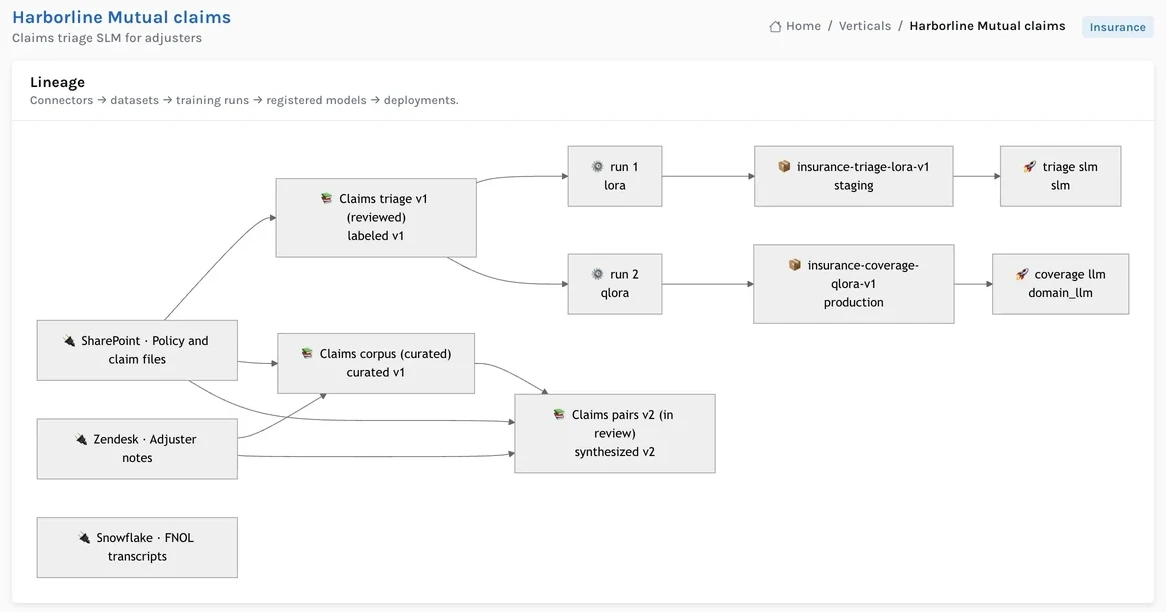
InsightDLM · Verticals · Harborline Mutual claims · LineageDemo data
The InsightDLM lineage view for a made-up insurer's claims project: SharePoint, Zendesk and Snowflake sources feed curated and reviewed datasets, which feed a LoRA run and a QLoRA run, which produce a staging triage model and a production coverage model, each served as a farm endpoint.
Open models and open-source engines underneath, your infrastructure around them
QwenGemmaPhiLlama MistralGranitegpt-ossDeepSeekOLMo Transformers · PEFT · TRLvLLMKueueKubeflowRay Kubernetes · OpenShiftAWS · Azure · Google Cloud · OCI
The problem

Every enterprise wants AI on its own data. Few can show where that data went.

Sending claims files, patient notes or customer complaints to a hosted model is a conversation with legal that rarely ends well. Fine-tuning your own model is the alternative, and most projects stall on the same three things.

Data

The prompt is the data leak

Every call to a hosted model ships the customer’s details with it. Redacting by hand doesn’t scale, and “we trust the provider” is not an answer an auditor accepts.

Fit

A general model doesn’t know your business

Policy forms, product codes, house style and the questions your people actually ask. A small model trained on them is cheaper per call and more consistent than a large one prompted to pretend.

Production

The model is ready; the governance isn’t

Which base model is allowed? Who approved this version, on what evidence? Which data trained it? Notebooks don’t answer those questions, so the model never ships.

How it works

Curate → Train → Govern → Serve → Improve

One pipeline on your own infrastructure, with a record of every step, so each model in production can be traced back to the data, recipe and people behind it.

  1. 1CurateConnect, generate, redact, review
  2. 2TrainLoRA, QLoRA, DPO or GRPO
  3. 3GovernSigned, gated, approved
  4. 4ServevLLM behind the gateway
  5. 5ImproveEscalations become data
Stage 1 · Curate

Training data people have actually read

Connect SharePoint, Confluence, Jira, ServiceNow, Slack and databases. Generate training records, redact PII, and review every record before it trains anything.

Your people decide

  • Which sources a project may use
  • Accept, edit or reject each record
  • When a dataset is published

InsightDLM does

  • Generates instruction or extraction records
  • Redacts PII and PHI with a residual-risk score
  • Tracks lineage from every source
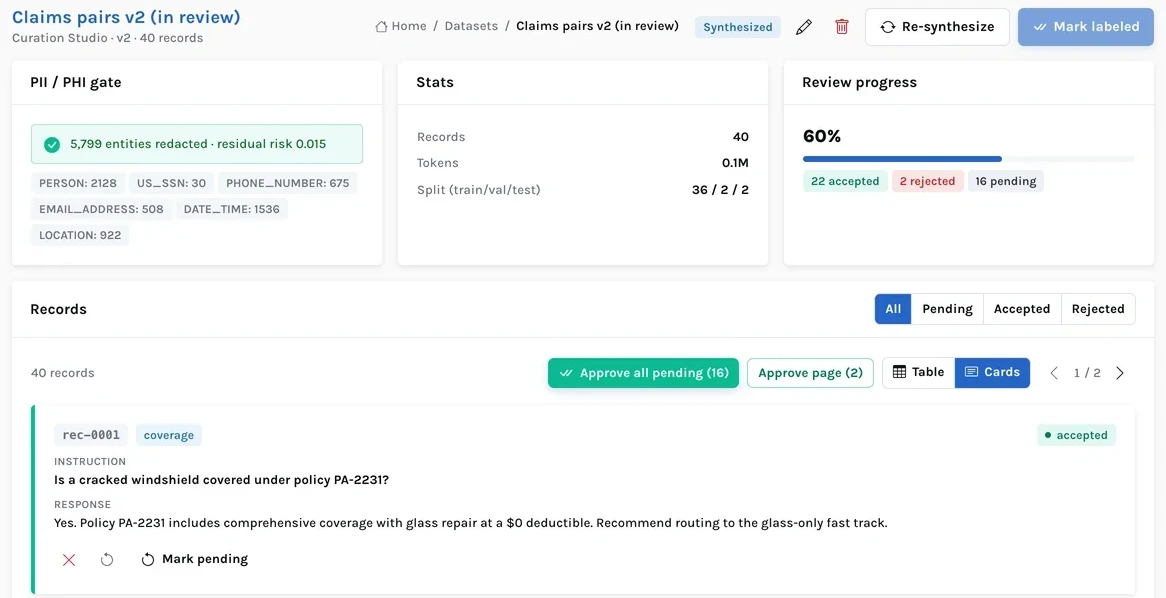
From connectors to training data
Datasets · Claims pairs v2 · ReviewDemo data
A dataset in review: the PII and PHI gate with 5,799 entities redacted, record stats, review progress at 60 percent, and two accepted records, a coverage question and a claim triage.
Stage 2 · Train

Will this run fit on our GPUs? Checked before it queues

LoRA, QLoRA, DPO or GRPO on an approved open model, as Kubernetes jobs on your GPU pools, after a fit check says the run will fit. When it won’t, it is refused with a suggestion: QLoRA instead of LoRA, a smaller base, or a shorter sequence.

Your people decide

  • Which GPU pools and queues to register
  • The recipe: method, base model, hyperparameters
  • Reward functions for reinforcement fine-tuning

InsightDLM does

  • Estimates memory, GPUs, time and cost per pool
  • Runs the job on your cluster
  • Records curves, hardware and the exact inputs
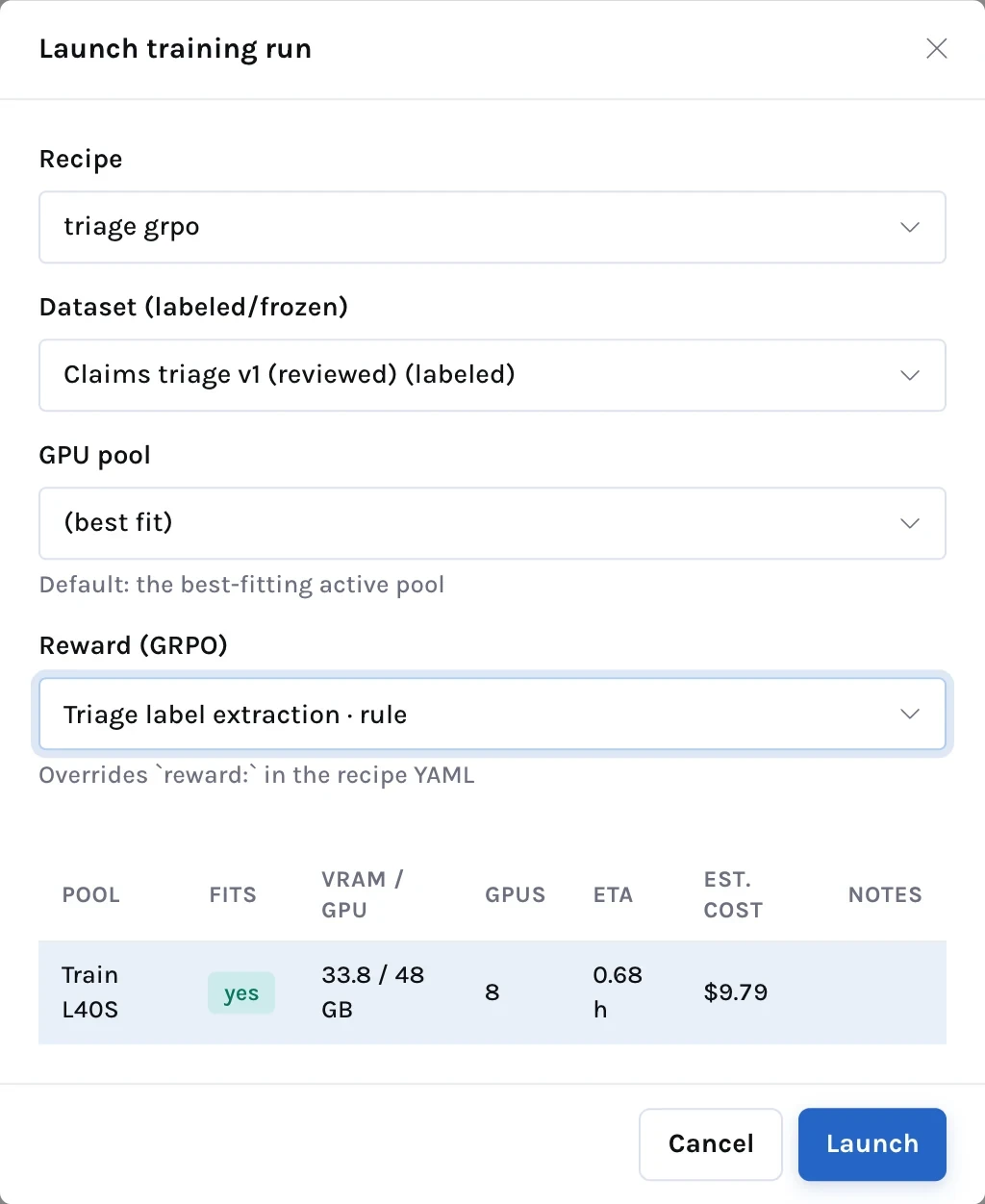
How it runs inside your Kubernetes
Training · Launch runDemo data
Launching a training run: recipe triage GRPO, the reviewed claims-triage dataset, best-fit GPU pool and a rule-based reward, with the fit check showing the Train L40S pool fits at 33.8 of 48 GB per GPU on 8 GPUs in about 0.68 hours.
Stage 3 · Govern

Nothing ships that can’t account for itself

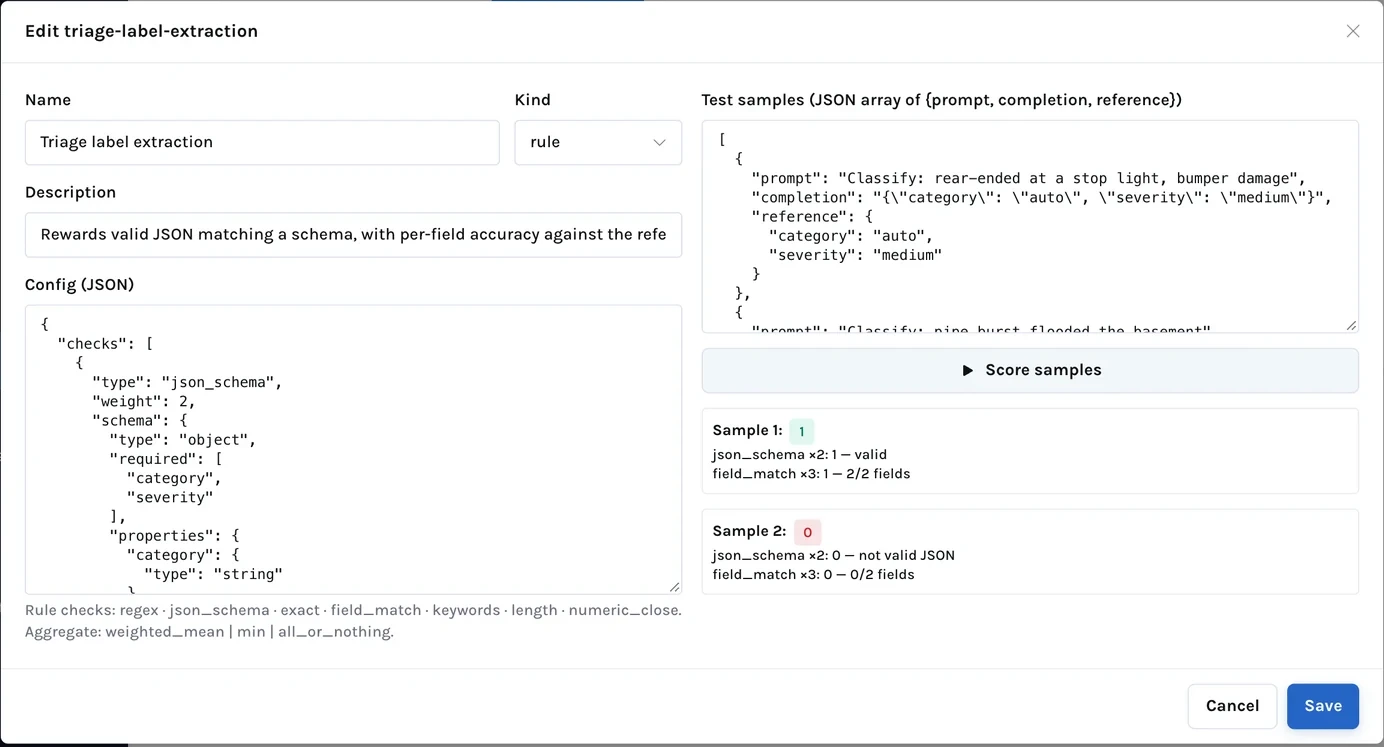
Every version is signed. Promotion is blocked until evaluations, safety, licence and an approver agree, and each model carries an AI bill of materials and a model card.

Your people decide

  • Which open models are on the allow-list
  • Evaluation and safety thresholds
  • Who approves promotion to production

InsightDLM does

  • Signs the manifest of data, recipe and weights
  • Checks lineage, licence and regression
  • Writes the model card and evidence pack
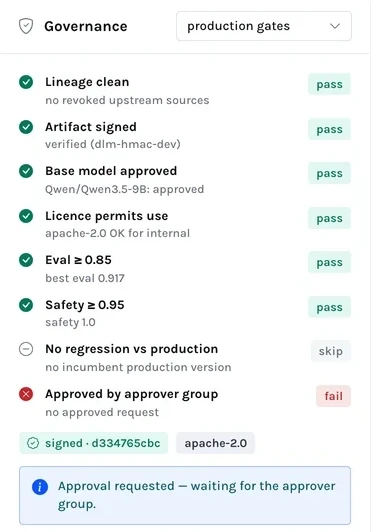
Signed models, gates and the audit chain
Registry · Governance gatesDemo data
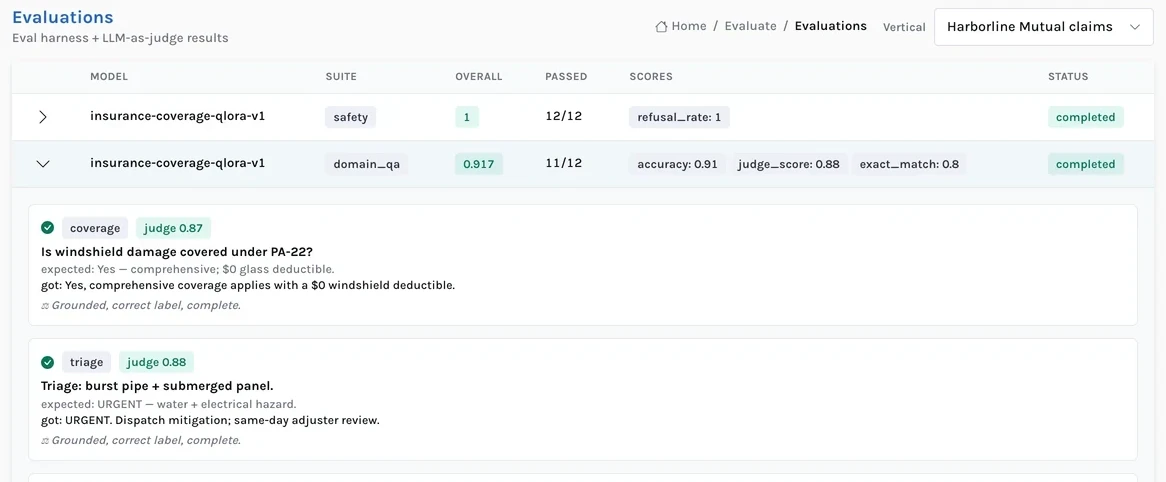
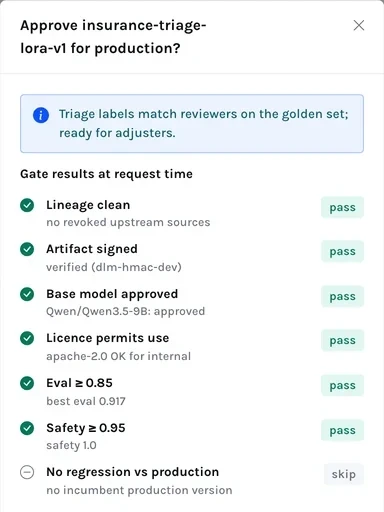
A model version's governance gates: lineage clean, artifact signed, base model approved, licence permits use, evaluation 0.917 and safety 1.0 passing, no-regression skipped, approval by the approver group still pending, with its signature and licence.
Stage 4 · Serve

One OpenAI-compatible call, checked at every step

Applications call a route, not a model, so a new version is promoted without a client changing a line. Every call is authenticated, policy-checked, redacted, routed to the cheapest confident tier, checked again and audited.

Your people decide

  • Which callers may use which routes
  • The data classification each route accepts
  • Whether a frontier tier exists at all

InsightDLM does

  • Masks PII and PHI before any model sees it
  • Blocks prompt injection on input, leakage on output
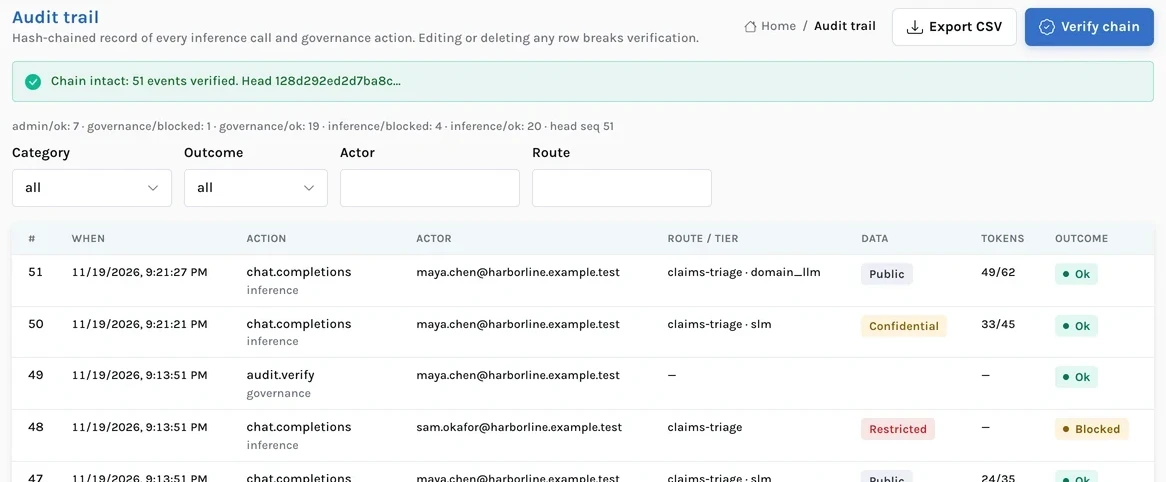
  • Writes a hash-chained audit record per call
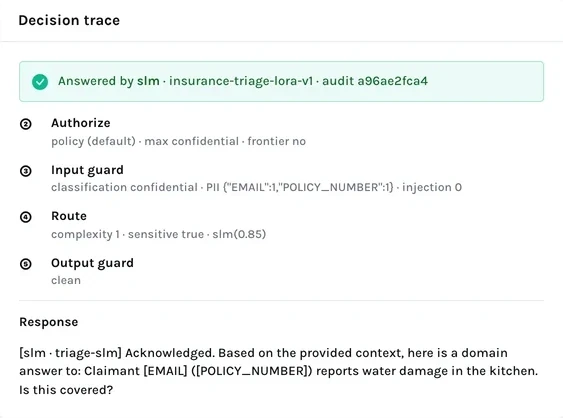
How the gateway works
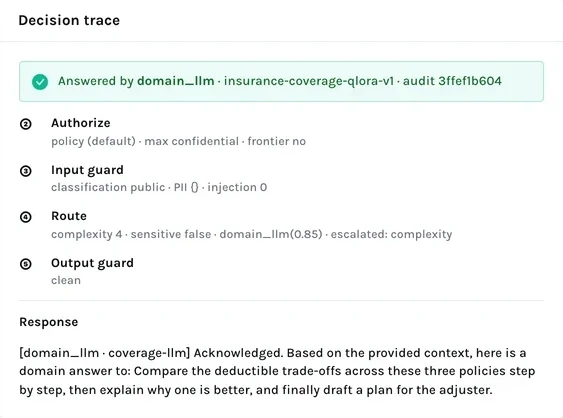
Gateway · Decision traceDemo data
The gateway decision trace for a made-up claim message: the caller is authorised, the input is classified confidential with an email address and a policy number redacted, the request is routed to the tier 1 small model, the output guard passes, and the redacted response is shown.
Stage 5 · Improve

Escalations become the next model’s training data

Requests the small model passes up a tier are captured, redacted and kept inside your network. Harvest them into a curated dataset, review it, retrain, and the share of escalated requests should fall with each round.

Your people decide

  • When to harvest and retrain
  • Which captured requests are kept
  • Whether the new version is promoted

InsightDLM does

  • Captures escalations with the reason and feedback
  • Builds a reviewable dataset from them
  • Puts the new version through the same gates
The improvement loop
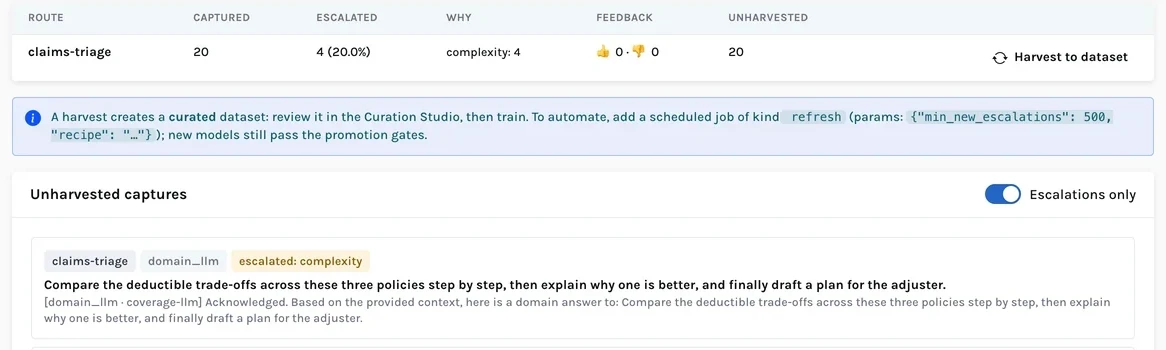
Improvement loop · claims-triageDemo data
The improvement loop for the claims-triage route: 20 captured requests, 4 escalated for complexity, a harvest-to-dataset action, and an unharvested escalated request comparing deductibles across three policies.

Where people stay in charge

  • Data Reviewers accept, edit or reject every training record before it is published.
  • Models Administrators decide which open models are allowed; nothing else can be trained or served.
  • Promotion An approver who isn’t the requester signs off, on the gate results, before production.
  • Data leaving Confidential and restricted requests can’t reach an outside model; you set the classification limit.
In your applications

Call a route, not a model

Any OpenAI SDK works: point it at your gateway and name a route. A new model version is promoted behind the route without a client changing a line, and every response says which tier and version answered, with the audit id.

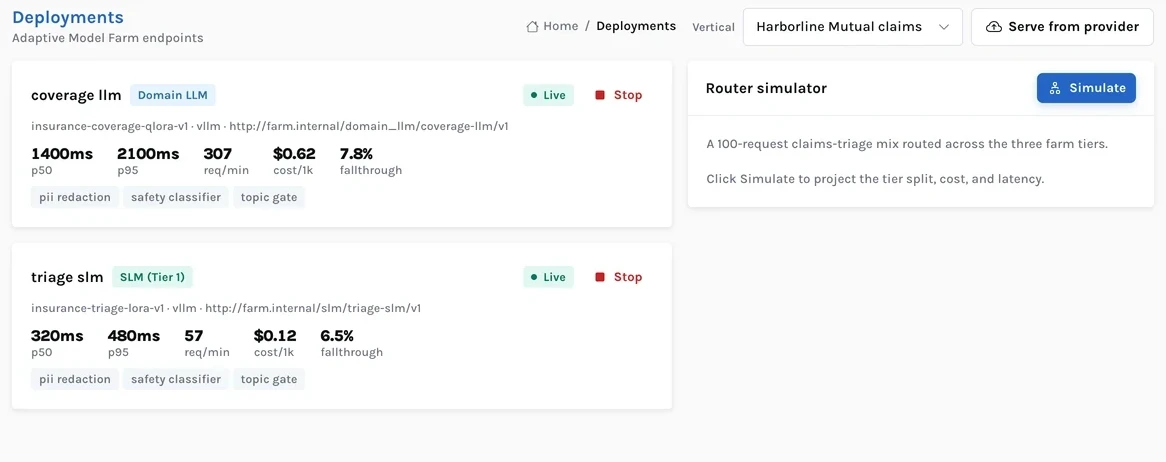
Promotion, the model farm and its router
# any OpenAI SDK, pointed at your gateway
from openai import OpenAI
client = OpenAI(base_url="https://dlm-gateway.example.test/v1",
                api_key=os.environ["DLM_API_KEY"])
resp = client.chat.completions.create(
    model="claims-triage",   # a route
    messages=[{"role": "user", "content": claim_note}])
# headers: x-dlm-tier, x-dlm-model-version, x-dlm-audit-id
Secure inference

Sensitive data stays on your network. Not as a policy, as a rule.

Nothing reaches a model server except through the gateway. A request classified confidential or restricted cannot be routed to an outside model at all — the frontier tier is removed before routing starts.

  • Who may call — API keys per application or your identity provider’s tokens, routes per caller, quotas, and allow/deny policies by IdP group
  • What they may send — PII and PHI masked, tokenised or refused; a data-classification limit per caller and per route
  • What gets in — prompt-injection and topic guards on input; leakage and safety checks on output
  • Which model answers — the cheapest tier that is confident, escalating one tier at a time
  • What is kept — a hash-chained audit record of every call, bodies encrypted with your key
How the gateway works
Gateway · Escalated requestDemo data
The decision trace for a multi-step request: authorised, classified public with no PII, routed past the small model to the tier 2 domain model because of its complexity, and the output guard passing.
Governance

Every model can say where it came from, and who let it ship

The records a validator, auditor or model-risk team asks for are kept as a side effect of doing the work, not reconstructed afterwards.

  • An allow-list of open models — requested, mirrored, scanned (no pickle weights, custom code flagged), digest-pinned and approved
  • Signed versions — the manifest of base model, data, recipe and weights signed with your key and checked again at deploy
  • Promotion gates — evaluation and safety thresholds, no regression against production, a compatible licence and an approver who isn’t the requester
  • Revocation that follows lineage — withdraw a source and every dataset, model and deployment built on it is flagged
  • Evidence packs — AI-BOM, model card and gate results mapped to the EU AI Act, NIST AI RMF and SR 11-7
Signed models, gates and the audit chain
Governance · ApprovalDemo data
Approving a model version for production: the requester's note, and the gate results at request time, all passing or skipped.
The console

From GPU pool to audit trail, in one place

Platform teams see every workload InsightDLM creates on the cluster. Model builders see whether a run fits. Approvers and auditors see the evidence.

Screens from the console with made-up projects and data.

Open models

Every current open model, grouped by publisher

Any model in safetensors that Transformers, PEFT and TRL can train and vLLM can serve works with InsightDLM. Your administrators decide which ones are allowed. The catalog lists today’s options with size, context, licence and the GPU each needs.

Browse the open-model catalog
46open models catalogued, from 12 publishers, checked against Hugging Face
1× 24 GBenough for QLoRA on the small models, by the fit check’s estimate
SFT → GRPOLoRA, QLoRA, full, DPO, ORPO and reinforcement fine-tuning
GraniteIBM
apache-2.0
SmolLMHugging Face
apache-2.0
OLMoAi2
apache-2.0
gpt-ossOpenAI
apache-2.0
DeepSeekDeepSeek
mit
GLMZ.ai
mit · other
KimiMoonshot AI
other

Apache-2.0, MIT or Llama community licence   publisher’s own licence: review the terms. Sizes and licences as published on Hugging Face, checked November 19, 2026. Context, GPU needs and notes for each model.

Deployment & trust

Your data, weights and inference stay in your cluster

InsightDLM is software you install, not a service you send data to. We don’t host your models or your GPUs. The one optional outbound call is dataset generation with a hosted teacher model, which you can leave off.

Install

A Helm chart

EKS, AKS, GKE, OKE, OpenShift or your own Kubernetes, with your database, object store and identity provider.

GPUs

Borrowed, not owned

Training runs as short-lived jobs in Kueue queues, so InsightDLM shares the cluster with your other workloads.

Air-gap

Air-gap ready

Training and serving run offline from Hugging Face, with base models from your mirror. An air-gap profile turns egress off.

Keys

Yours, by reference

Models signed and audit bodies encrypted with your keys, in Vault or your cloud KMS.

From the blog

How domain models are built, governed and served

Guide

Reinforcement fine-tuning with rewards you can test

When a good answer is easier to check than to write: GRPO on your own GPUs.

Read
How it works

The improvement loop

Escalated requests become the next model’s training data, without leaving your network.

Read
Use case

Prior authorization with PHI on-network

A fictional health plan builds a checklist assistant its nurses can trust.

Read

Bring one task and a sample of the data behind it

In a working session we set up the project, review a training set, check the fit on your GPUs and stand up a gateway route, on your cluster or a sandbox.

Request a demo